# Carbon Grouped USD Token ($USD)
$USD on Demex is a special token that represents a basket of whitelisted USD stablecoins.
Stablecoins deposited on Demex are automatically converted to $USD at a 1:1 rate. Likewise, $USD can be withdrawn to their constituent tokens at a 1:1 rate.
To get a comprehensive breakdown of all tokens in the $USD basket, visit Carbonscan [here](https://scan.carbon.network/group?net=main).
To find out more about Carbon Grouped Tokens, visit [this guide](https://guide.dem.exchange/~/changes/REiUq5w3vfdfOKEL0jdy/welcome/tokens-and-contracts/carbon-grouped-tokens).
## **Withdraw $USD**
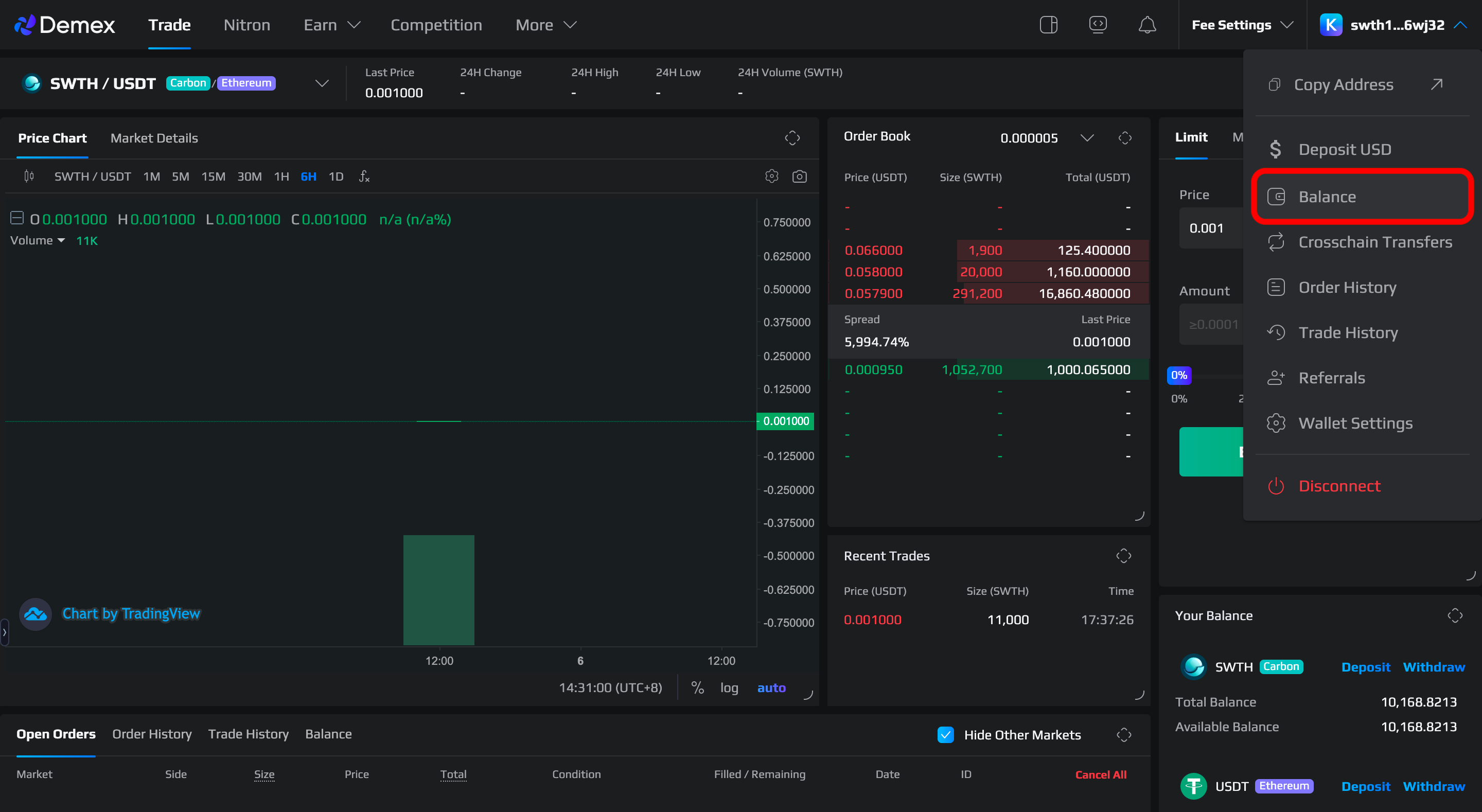
**Step 1**: Navigate to the [Demex website](https://app.dem.exchange/) and select '[Balance](https://app.dem.exchange/account/balance)' from the menu located on the right-hand side.
**Step 2**: Select 'Withdraw' to withdraw $USD on Demex.
**Step 3:** Auto-conversion is active. Choose the stablecoin that you would like to convert from USD and withdraw.
The following example withdraws $BUSD from $USD:
**Step 3**: Select a network for withdrawal.
In our example, $BUSD is supported on the Ethereum and BNB Smart Chain (BSC) network. Select the network (and wallet) you wish to withdraw $BUSD to.
{% hint style="warning" %}
**Tokens are at risk of being lost should the wrong network be selected.**
It is important to select the appropriate network while depositing or withdrawing tokens to prevent the possibility of losing them. To avoid any potential risks, make sure to choose the correct network.
{% endhint %}
{% hint style="info" %}
For more information on Network Selection, click [here](https://guide.dem.exchange/~/changes/REiUq5w3vfdfOKEL0jdy/welcome/network-selection).
{% endhint %}
**Step 4**: Enter the recipient's address accordingly. To withdraw the amount you want, you can either enter the specific amount manually or adjust it using the toggle between 0% and 100%. After that, you can click the 'Withdraw' button.
{% hint style="info" %}
Your stablecoin withdrawal will be auto-converted from USD at a 1:1 ratio.
{% endhint %}
**Step 5**: Verify and authorize the transaction that appears on the pop-up window.
**Step 6:** To track the status of your transaction after withdrawing your tokens, click on your wallet address in the top left corner and go to the 'Transactions' section on Carbonscan. If the withdrawal is successful, the withdrawal status will be shown as 'Success'.
{% hint style="success" %}
Congratulations, you have successfully withdrawn your tokens!
{% endhint %}