# Import Existing Account

The following instructions illustrate how to import an existing account (Ledger, MetaMask or Encrypted Key) on Keplr.

**Step 1**: Install Keplr on Chrome Extension [here](https://chrome.google.com/webstore/detail/keplr/dmkamcknogkgcdfhhbddcghachkejeap?hl=en).

<figure><img src="https://3548599389-files.gitbook.io/~/files/v0/b/gitbook-x-prod.appspot.com/o/spaces%2F-MO-XZjWplLUJPNs07G8%2Fuploads%2FTqyCCTj0znp3q5JXQ9gO%2FScreenshot%202023-03-14%20at%203.30.17%20PM.png?alt=media&#x26;token=3db45a95-16a9-4547-9f6d-dd990b835774" alt=""><figcaption></figcaption></figure>

**Step 2**: Select 'Import existing account'.

<figure><img src="https://3548599389-files.gitbook.io/~/files/v0/b/gitbook-x-prod.appspot.com/o/spaces%2F-MO-XZjWplLUJPNs07G8%2Fuploads%2Fb6PpNN3QiYjweSgNwV3Y%2FScreenshot%202023-03-16%20at%2012.25.19%20PM.png?alt=media&#x26;token=5d170029-0dd7-4467-a885-4783490f362a" alt=""><figcaption></figcaption></figure>

**Step 3**: To import your existing account, there are 2 options.

**Option A:** Input your seed phrase from your Demex account. Then, you will need to select a name for your wallet account and set a password.

<figure><img src="https://3548599389-files.gitbook.io/~/files/v0/b/gitbook-x-prod.appspot.com/o/spaces%2F-MO-XZjWplLUJPNs07G8%2Fuploads%2Fb7MHG07OSE4ipcTi8GA1%2FScreenshot%202023-03-16%20at%2012.28.13%20PM.png?alt=media&#x26;token=0d05fdc3-40e6-4087-99c8-a04a446b61f9" alt=""><figcaption></figcaption></figure>

{% hint style="info" %}
To locate your seed phrase on Demex, navigate to the Wallet Settings and click on 'Show' under 'Mnemonic'.
{% endhint %}

<figure><img src="https://3548599389-files.gitbook.io/~/files/v0/b/gitbook-x-prod.appspot.com/o/spaces%2F-MO-XZjWplLUJPNs07G8%2Fuploads%2FXNZhOPLBsAGZQYkQurIP%2FScreenshot%202023-03-16%20at%2012.30.25%20PM.png?alt=media&#x26;token=862e58b2-aa19-4785-862e-525110beb67c" alt=""><figcaption><p>Click on 'Wallet Settings'.</p></figcaption></figure>

<figure><img src="https://3548599389-files.gitbook.io/~/files/v0/b/gitbook-x-prod.appspot.com/o/spaces%2F-MO-XZjWplLUJPNs07G8%2Fuploads%2FTx5CLujHBwvE9QSzBauD%2FScreenshot%202023-03-16%20at%2012.35.14%20PM.png?alt=media&#x26;token=4cbcce29-6216-4c5e-bfb5-bef6f6bae70d" alt=""><figcaption><p>Click on 'Show' under 'Mnemonic'.</p></figcaption></figure>

{% hint style="danger" %}
The mnemonic seed serves as a means of regaining access to your wallet if you happen to lose access to or unintentionally reset your Keplr wallet. Users are highly encouraged to store their mnemonic phrase safely in a secure location that is only accessible by them. If the mnemonic seed is lost, it cannot be recovered.
{% endhint %}

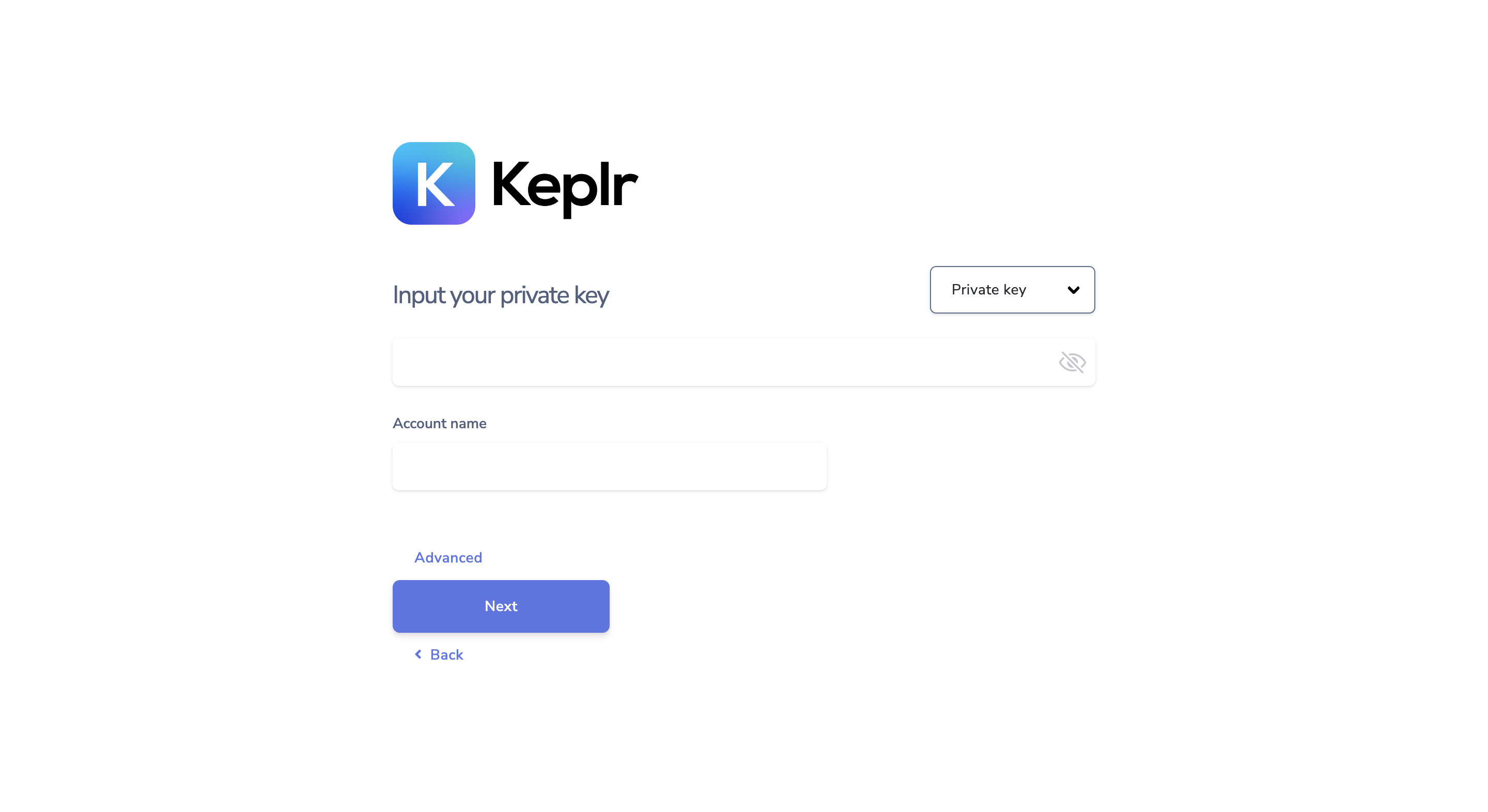
**Option B**: Input your private key and account name.

<figure><img src="https://3548599389-files.gitbook.io/~/files/v0/b/gitbook-x-prod.appspot.com/o/spaces%2F-MO-XZjWplLUJPNs07G8%2Fuploads%2FLTyYCqo0vqJNJvAe30kF%2FScreenshot%202023-05-15%20at%205.30.21%20PM.png?alt=media&#x26;token=517f197a-688e-46ca-8ac6-76bcf2789594" alt=""><figcaption></figcaption></figure>

**Step 4:** Once you have completed the above steps, click 'Done' and proceed to sign in to your Keplr account.

<figure><img src="https://3548599389-files.gitbook.io/~/files/v0/b/gitbook-x-prod.appspot.com/o/spaces%2F-MO-XZjWplLUJPNs07G8%2Fuploads%2FbpdIF07XSn8dIwaUluS4%2FScreenshot%202023-03-14%20at%203.38.43%20PM.png?alt=media&#x26;token=5de3fea3-064c-4d58-abf4-1364f6cba566" alt=""><figcaption></figcaption></figure>

{% hint style="success" %}
Well done, you have successfully imported your existing account to Keplr!
{% endhint %}