# Return Assets

On Nitron, you can borrow assets without actual ownership at a low interest rate. You can return the borrowed assets at any given time.

Follow these steps to return your borrowed assets:

**Step 1:** Launch Demex, click “Earn” in the navigation menu and click “Nitron” under the dropdown bar.

<figure><img src="https://3548599389-files.gitbook.io/~/files/v0/b/gitbook-x-prod.appspot.com/o/spaces%2F-MO-XZjWplLUJPNs07G8%2Fuploads%2FqapzxOrsZSHVZWmASSdb%2FUntitled%20(1).png?alt=media&#x26;token=dd952a8f-d419-41b3-ba6f-0ca9f0e1cf47" alt=""><figcaption></figcaption></figure>

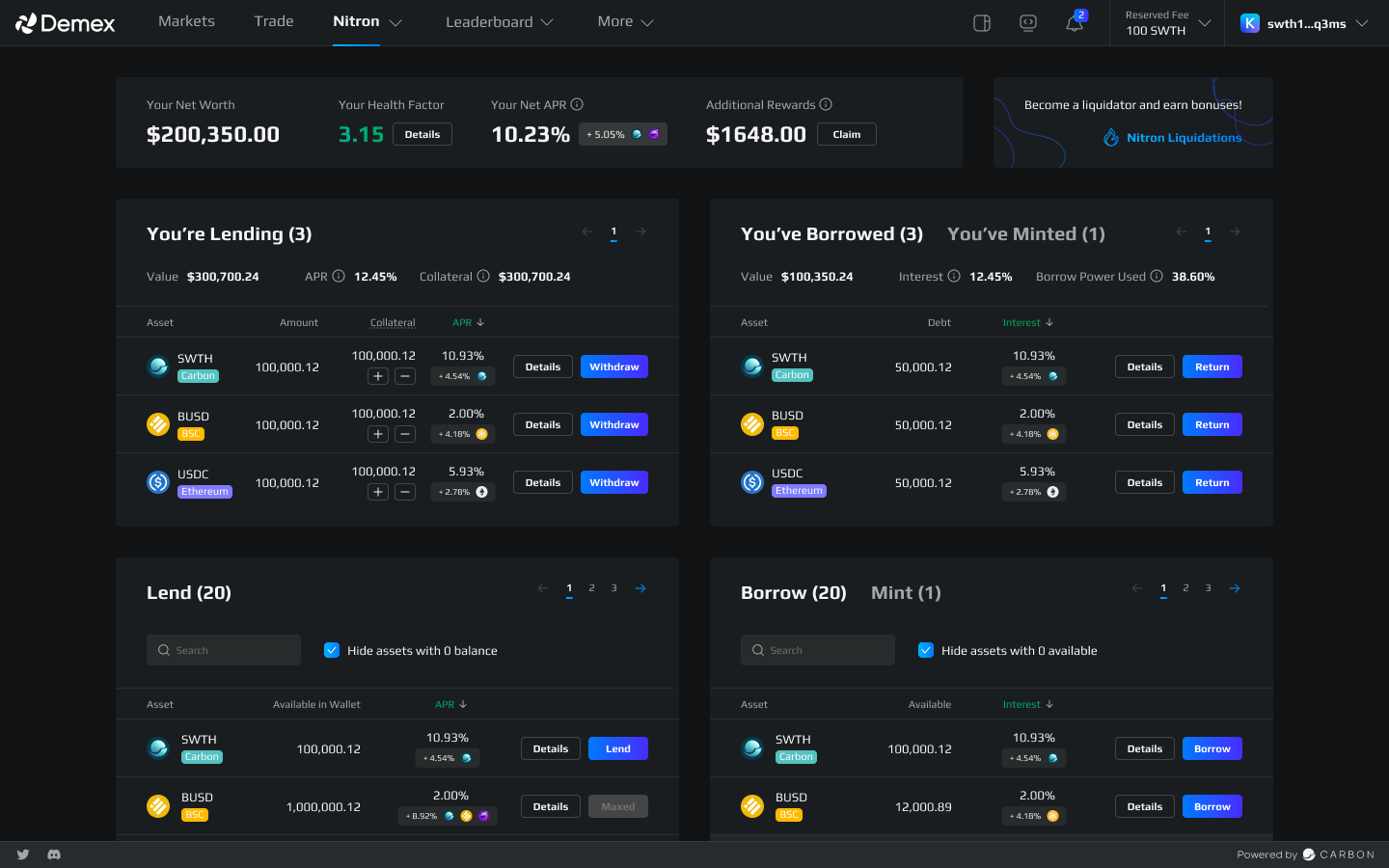
The Nitron page opens up as shown below.

<figure><img src="https://3548599389-files.gitbook.io/~/files/v0/b/gitbook-x-prod.appspot.com/o/spaces%2F-MO-XZjWplLUJPNs07G8%2Fuploads%2FJWrmCwX9rC7km1cm2Y6L%2FNEW.png?alt=media&#x26;token=bdaa7880-8653-4bca-99e0-d4cccb5bb4cb" alt=""><figcaption></figcaption></figure>

**Step 2:** Under the “You’ve Borrowed” window, you can view all assets that you have borrowed at any given time. For example, the SWTH token was initially borrowed at an interest rate of 10.93%.

<figure><img src="https://3548599389-files.gitbook.io/~/files/v0/b/gitbook-x-prod.appspot.com/o/spaces%2F-MO-XZjWplLUJPNs07G8%2Fuploads%2FMTYozq5mFWK6UayKePyr%2FUntitled%20(2).png?alt=media&#x26;token=b503c130-c35b-4aee-9621-91949bc62eea" alt=""><figcaption></figcaption></figure>

**Step 3:** Click the “Return” button on the desired borrowed asset. The “Return” page opens up as shown below.

<figure><img src="https://3548599389-files.gitbook.io/~/files/v0/b/gitbook-x-prod.appspot.com/o/spaces%2F-MO-XZjWplLUJPNs07G8%2Fuploads%2FNtiw21qEgPii1V4wNFbW%2FUntitled%20(3).png?alt=media&#x26;token=f100db93-7666-4ae3-8dfc-13342605c946" alt=""><figcaption></figcaption></figure>

**Step 4:** Enter the desired amount that you wish to return. Use the dropdown menu to select the asset that you wish to use to repay your loan.

<figure><img src="https://3548599389-files.gitbook.io/~/files/v0/b/gitbook-x-prod.appspot.com/o/spaces%2F-MO-XZjWplLUJPNs07G8%2Fuploads%2FsYrdxw7MmmGIINK5kKJE%2FUntitled%20(4).png?alt=media&#x26;token=d956b57e-71b0-4dbf-af0c-8889146745f9" alt=""><figcaption></figcaption></figure>

**Step 5:** Click the “Return” button to return the borrowed amount.

<figure><img src="https://3548599389-files.gitbook.io/~/files/v0/b/gitbook-x-prod.appspot.com/o/spaces%2F-MO-XZjWplLUJPNs07G8%2Fuploads%2FaC9vTLc9IE1vOwadSy0j%2FWithdraw%20Success%20(1).png?alt=media&#x26;token=cefeb921-4886-4029-996c-60b88d61529f" alt=""><figcaption></figcaption></figure>

Congratulations! You have successfully returned the borrowed asset.